Deploying Your First Smart Contract
This guide will help you deploy your first smart contract on the Watr Testnet.
We’ll use Hardhat, a popular Ethereum development environment.
Prerequisites
Make sure you have the following installed:
Step 1: Create a Hardhat Project
Open your terminal and run:
mkdir my-watr-project
cd my-watr-project
npm init -y
npm install --save-dev hardhat
npx hardhat
Step 2: Write Your Smart Contract
Go to contracts/Lock.sol. Replace it with a simple HelloWorld.sol contract:
// SPDX-License-Identifier: MIT
pragma solidity ^0.8.20;

contract HelloWorld {
    string public message = "Hello, Watr!";

    function setMessage(string calldata newMessage) public {
        message = newMessage;
    }
}
Step 3: Configure Hardhat for Watr
Edit hardhat.config.js and add the Watr Testnet network:
require("@nomicfoundation/hardhat-toolbox");

module.exports = {
  solidity: "0.8.20",
  networks: {
    watrTestnet: {
      url: "https://rpc.testnet.watr.org/ext/bc/2ZZiR6T2sJjebQguABb53rRpzme8zfK4R9zt5vMM8MX1oUm3g/rpc",
      chainId: 92870,
      accounts: ["0xYOUR_PRIVATE_KEY_HERE"]
    }
  }
};
Store your private key in a .env file:
PRIVATE_KEY=0xabc123...
Then update your config:
require("dotenv").config();
// ...
accounts: [process.env.PRIVATE_KEY]
Step 4: Deploy the Contract
Create a new script in scripts/deploy.js:
const hre = require("hardhat");

async function main() {
  const HelloWorld = await hre.ethers.getContractFactory("HelloWorld");
  const hello = await HelloWorld.deploy();

  await hello.waitForDeployment?.(); // optional chaining in case method exists

  console.log("Deployed contract object:", hello);
  console.log(`Contract deployed to: ${hello.target || hello.address}`);
}

main().catch((error) => {
  console.error(error);
  process.exitCode = 1;
});
Run the script on Watr Testnet:
npx hardhat run scripts/deploy.js --network watrTestnet
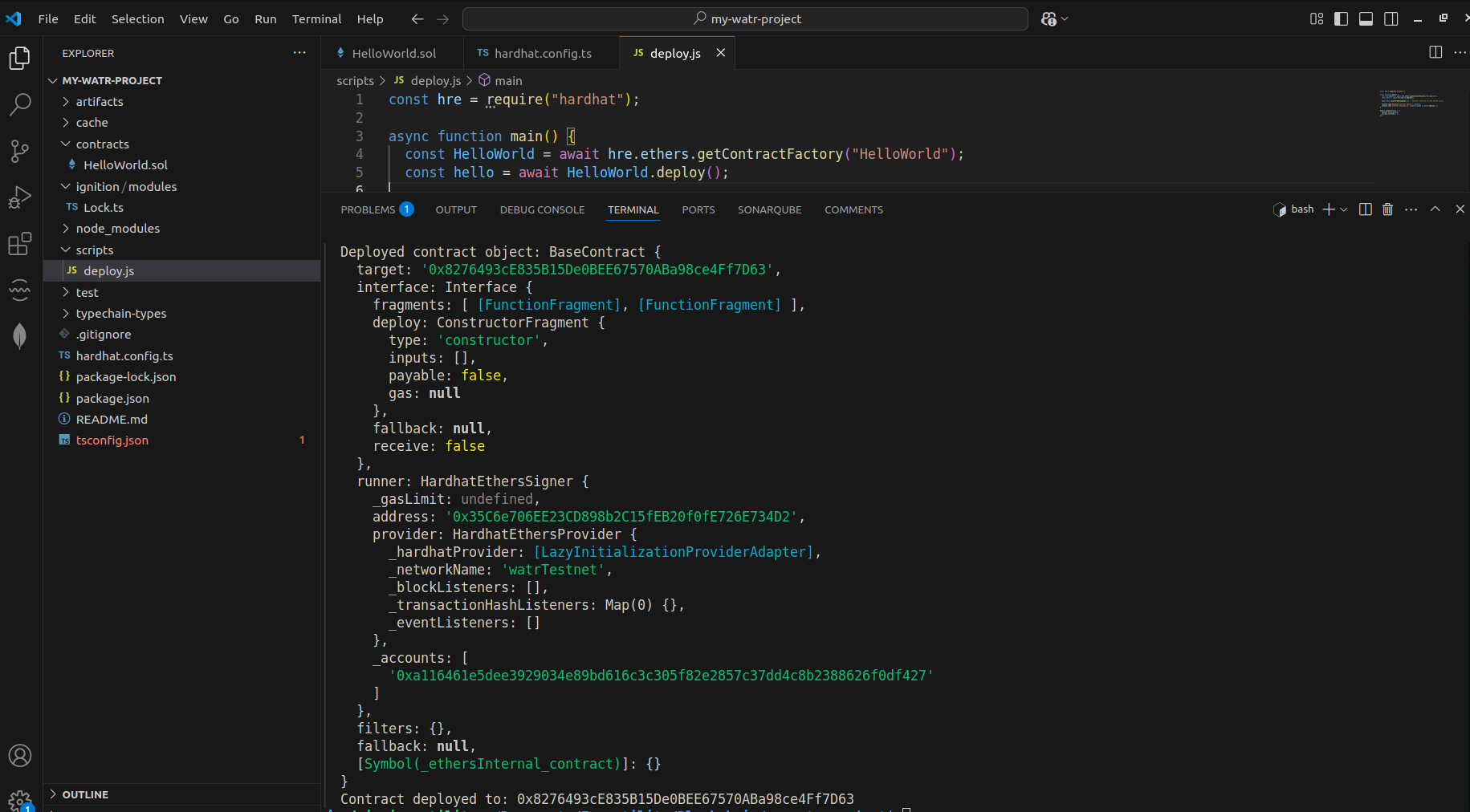
You should see your contract’s address logged in the terminal.